

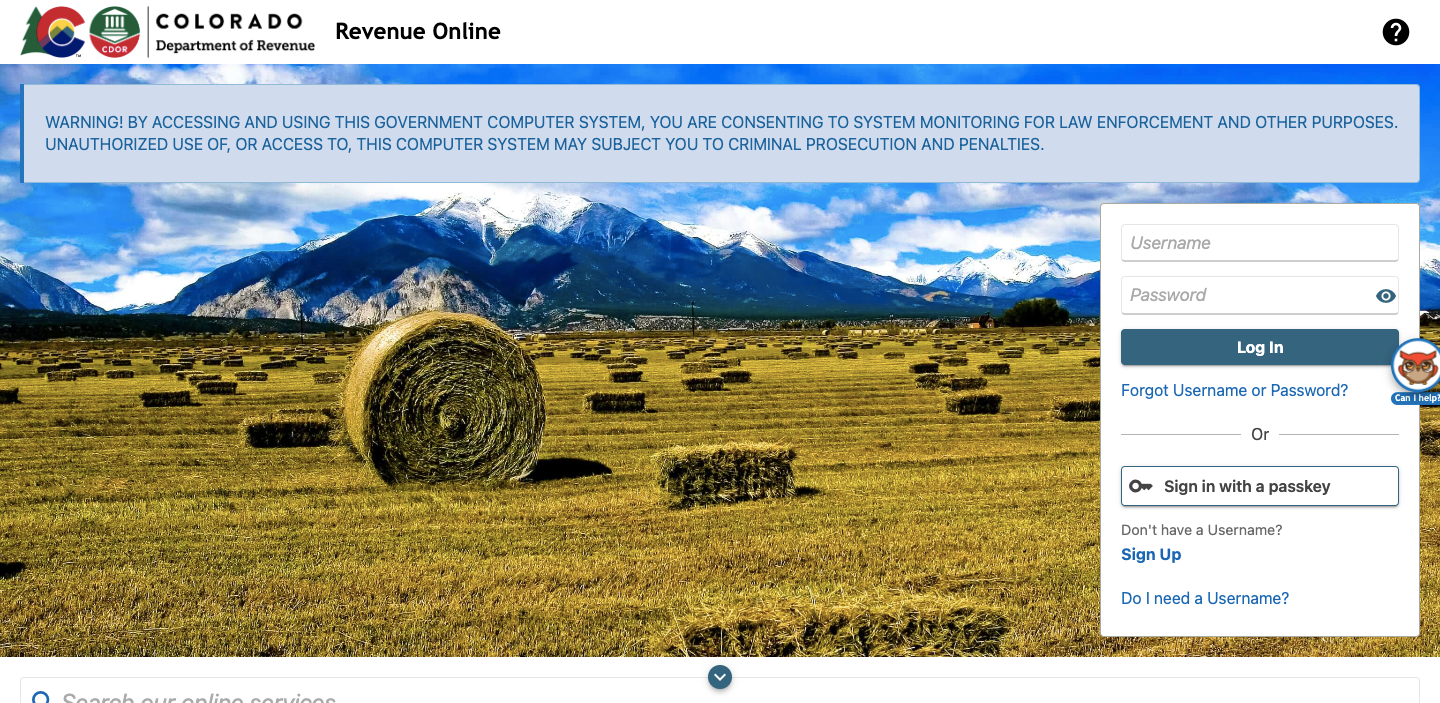
colorado.gov/RevenueOnline – Pay Colorado State Taxes
Paying taxes is important for all taxpayers. In Colorado, the state government levies taxes on individuals and businesses to fund several services and public goods. If you are living or doing any business in Colorado, then you have to pay state taxes on your income, property, and other taxable assets.
Through this article, we will discuss how to Pay Colorado State Taxes, the different tax forms you might know, and the various payment methods available to taxpayers.
About Colorado State Taxes
Colorado State Taxes are levied on several sources of income, that includes salaries, self-employment earnings, wages, and tips. Colorado has a flat income tax rate of 4.55%, that means every taxpayers pay the state rate regardless of their income level.
Along with that, they also charge property taxes on the real estate and personal property owned by individuals and businesses. However, the exact rate of the property tax varies based on the location and value of the property.
File Colorado State Tax Return
To start making the payment for your state income tax in Colorado, you have to file a tax return with the state government. It is a document that shows your income and deductions for the tax year and calculates the amount of tax you owe to the state.
The taxes are due on April 15th every year, which is the same deadline as the federal income tax return. If you cannot file your tax return on time, then you can request an extension until October 15th.
In order to file a tax return, you have to use the appropriate tax form based on your filing status and income level. The most common form used by taxpayers is the Colorado Individual Income Tax Return (Form 104). This form is used to report your deductions, income, and credits for the tax year.
If you own a business or are self-employed in Colorado, then you have to file additional tax forms such as Colorado C Corporation Income Tax Return (Form 112) or Colorado Partnership or S Corporation tax Return (Form 106).
Available Payment Method to Pay Colorado State Taxes
Once you have completed the filling of the tax return, then you have to pay the amount of tax you own to the state government. The Colorado Department of Revenue provides several payment methods for taxpayers, that includes the followings:
Pay Colorado State Taxes Online
The easiest and fasted method to Pay Colorado State Taxes is the online payment system. You can use your credit card, debit card, or electronic check to pay your taxes. You can have to follow these simple instructions as mentioned below to pay for the Colorado State Income Tax:
- Firstly, you need to visit this link colorado.gov/RevenueOnline.
- Then, provide your registered login credentials to log in to make a payment.
- You have to locate the “Payment Options” on the Revenue Online homepage.
- Then, click on “Make a Payment”.
- Please read through the various service fees and processing timelines before selecting a payment option.
- Then, either you can select the “Debit or Credit Card” or “E-Check” option.
- You have to provide all the required details and select the “Pay Online” option.
- After that, simply follow the on-screen prompts to successfully pay your Colorado taxes.
Make the Payment through Electronic Funds Transfer
The Colorado Department of Revenue provides an EFT tax payment service. You can use Electronic Funds Transfer to make the payment for more than 50 types of businesses and personal tax liabilities.
Colorado’s EFT program provides two choices, ACH Debit, and ACH Credit. You can select any one of these two options or both. Firstly, you have to register for the EFT service to make the payment. If you already register for the EFT, then you have to follow these simple instructions below:
- Firstly, visit this link tax.colorado.gov/electronic-funds-transfer.
- From that page, you just need to select the “Make a Payment” option for the next step.
- You have to provide your EFT ID Number and Web Password in the given fields.
- After entering the required details, you just have to select the “Log In” button.
- From there, you can easily make the payment for the Colorado State Taxes.
Make Payment in Cash
Some taxpayers can also pay their taxes with cash. Firstly, visit the Tax Payment Options page to verify if your tax bill can be paid in cash. Please do not send your cash through the mail.
You can only make the cash payment at the Pierce Street Department of Revenue Location. When making the payment in cash, please make sure to bring your tax bill/payment voucher with you. There is no need to making an appointment to visit your nearest CDOR Cashier’s Office but suggested by marijuana businesses to make the payments in cash.
Pierce Location Address:
1881 Pierce Street
Entrance A
Lakewood, CO 80214
Hours:
Monday through Friday (excluding state holidays) 8:00 a.m. to 4:00 p.m.
Make Payment with Money Order or Check
Before making the payment with Money Order or Check, you should try EFT, a Credit/Debit Card, or an E-Check, which reduces error and processing time. You should know that applicable penalties and interest will continue to accrue while our payment is being processed. Also, make sure to visit the Tax Payment Options Page to verify whether your tax bill can be paid with a check or money order.
If you prefer to pay by mail, then you can send or check or money order to the Colorado Department of Revenue. Please be sure to include your name, address, and social security number with your payment stub. Mail the payment to:
Colorado Department of Revenue
Denver, CO 80261-0008
Customer Service of Colorado Tax Payer Service
If you have any queries or face any issues while paying for your Colorado State Taxes, you can contact the customer service department.
Call the Taxpayer Helpline at (303) 238-7378.
Hours of Operation: Monday through Friday, 8:00 a.m. to 4:30 p.m. MT
EFT/Electronic Payment: 303-205-8333
Email At: DOR_TaxpayerService@state.co.us
Mail At:
U.S. Postal Service
Colorado Department of Revenue
Section or Employee Name and Room Number
P.O. Box 17087
Denver, CO 80217-0087
Express Mail Delivery (DHL, FedEx, UPS, etc.)
Colorado Department of Revenue
Section or Employee Name and Room Number
1881 Pierce St.
Entrance B
Lakewood, CO 80214
FAQs about Colorado State Income Tax
Q: Are there processing fees for paying your taxes?
A: Yes, you will be charged the processing fees for making the payments, and are automatically included in your total payment. The processing fees are calculated as follows:
E-Check: Amount Due + $1.00
Check/Debit Cards: (Amount Due + 75¢) x 2.25%
Q: I am not able to pay my tax bill in full. How do I set up a payment plan for taxes?
A: If you cannot complete your tax debt, you can request a payment plan. The department will allow you to make monthly payments until your debt is fully paid. If you want to request a payment plan for an individual or couple filing jointly, then you have to visit the individual Income tax payment plan web page at https://tax.colorado.gov/payment-plan.
Q: I do not agree with the bill I received. How do I file a protest?
A: If you are disagreeing with the balance due notice have the right to protest the amount due. Your protest must be filed in writing within 30 days after receiving your bill. You can contact me with any specific documentation required. Check the protest right web page for information on how to file a protest.
Conclusion
So, that is all for this article regarding the Pay Colorado State Texas. Through this article, we have tried to provide all the available payment methods to make the payment for your taxes. By understanding all the different tax forms and payment methods available, you can ensure that you can pay your taxes on time and avoid penalties or interest charges. Still, if you have any questions or face any issues, you can contact the Colorado Department of Revenue for help.
